How to Prevent and Handle DDoS Attacks on Your Website
flooding a targeted server with traffic, overwhelming its resources and rendering the website unusable. These attacks can vary in complexity and scale, from small, short-lived disruptions to large, prolonged assaults.
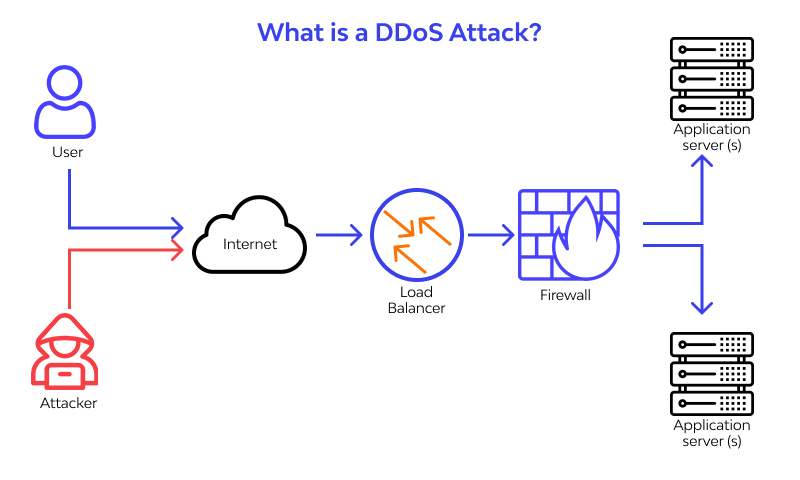
Distributed Denial of Service (DDoS) attacks are a significant threat to website security and performance. These attacks aim to overwhelm your server with traffic, causing your site to become slow or completely unavailable to users. Understanding how to prevent and handle DDoS attacks is crucial for maintaining the integrity and availability of your website. This article will provide you with comprehensive strategies to protect your website from DDoS attacks and steps to mitigate their impact if they occur.
Understanding DDoS Attacks
A DDoS attack involves multiple compromised systems (often part of a botnet) flooding a targeted server with traffic, overwhelming its resources and rendering the website unusable. These attacks can vary in complexity and scale, from small, short-lived disruptions to large, prolonged assaults.
Signs of a DDoS Attack
-
Unusually Slow Network Performance
- Lagging Pages: Web pages take longer to load than usual.
- Delayed Responses: Users experience delays when interacting with your site.
-
Increased Bandwidth Usage
- Bandwidth Spike: A sudden and significant increase in bandwidth usage.
- Unexpected Traffic: High volumes of traffic from unfamiliar sources.
-
Website Outages
- Intermittent Downtime: The site goes down sporadically.
- Complete Unavailability: The site becomes entirely inaccessible.
-
Server Overload
- High CPU Usage: The server's CPU usage spikes unexpectedly.
- Memory Exhaustion: The server runs out of available memory.
Preventing DDoS Attacks
-
Use a Content Delivery Network (CDN)
- Distributed Network: CDNs distribute traffic across multiple servers, reducing the impact on any single server.
- Traffic Filtering: CDNs filter out malicious traffic before it reaches your server.
-
Implement Web Application Firewalls (WAF)
- Traffic Inspection: WAFs inspect incoming traffic and block malicious requests.
- Custom Rules: Configure rules to block known attack patterns.
-
Enable Rate Limiting
- Request Limits: Limit the number of requests a single IP can make in a specified time frame.
- Protection Thresholds: Set thresholds for various types of requests (e.g., login attempts).
-
Use DDoS Protection Services
- Specialized Services: Services like Cloudflare, Akamai, and AWS Shield provide advanced DDoS protection.
- Real-Time Monitoring: These services offer real-time monitoring and automated responses to DDoS attacks.
-
Keep Your Software Updated
- Security Patches: Regularly update your web server, CMS, and other software to patch vulnerabilities.
- Automated Updates: Enable automated updates when possible to ensure timely patching.
-
Monitor Network Traffic
- Anomaly Detection: Use network monitoring tools to detect unusual traffic patterns.
- Early Warning Systems: Set up alerts to notify you of potential DDoS attacks.
-
Create a DDoS Response Plan
- Preparedness: Develop a plan that outlines the steps to take during a DDoS attack.
- Team Coordination: Ensure your IT team knows their roles and responsibilities.
Handling a DDoS Attack
-
Identify the Attack
- Traffic Analysis: Use analytics tools to confirm the presence and type of DDoS attack.
- Source Identification: Identify the sources of the malicious traffic.
-
Activate DDoS Mitigation Services
- Enable Services: If not already active, enable your DDoS protection services.
- Contact Providers: Inform your DDoS protection provider about the attack for additional support.
-
Block Malicious IPs
- IP Blacklisting: Use firewall rules to block IP addresses involved in the attack.
- Automated Blocking: Configure automated systems to detect and block malicious IPs.
-
Rate Limit Requests
- Temporary Limits: Increase rate limiting to reduce the impact of the attack.
- Service-Specific Limits: Apply rate limiting to specific services or endpoints under attack.
-
Diversify Network Resources
- Load Balancing: Distribute traffic across multiple servers or data centers.
- Geo-Blocking: Block traffic from regions not relevant to your user base if they are the source of the attack.
-
Maintain Communication
- User Notifications: Inform users about the attack and the steps being taken to mitigate it.
- Regular Updates: Provide updates on the status of your mitigation efforts.
-
Analyze and Improve
- Post-Attack Analysis: Review the attack to understand its scope and methods.
- Strengthen Defenses: Enhance your security measures based on the insights gained.
Conclusion
Preventing and handling DDoS attacks is vital for maintaining your website's availability and performance. By implementing robust security measures, monitoring traffic, and having a response plan in place, you can protect your site from the disruptive effects of DDoS attacks. Regularly review and update your security practices to stay ahead of evolving threats and ensure the continuous protection of your online presence.
Table of Contents
Share this article
Get More Insights
Subscribe to our newsletter for weekly cloud tips.
Related Articles
View All →
Set Up Proffesional-Emails with Your Domain: A Guide for Professional Communication
Creating email accounts that use your domain name adds a professional touch to your business communications and enhances brand credibility.

Choosing the Right Web Hosting Plan: Comparison of Domains, Hosting, and Reseller Solutions
Choosing the right web hosting plan impacts SEO rankings, site speed, and scalability. Compare domain registration, shared hosting, VPS, and WordPress-optimized servers for performance. Prioritize SSL security, SSD storage, and 24/7 support. Reseller hosting? Opt for white-label solutions and scalable resources. Master Core Web Vitals and keyword-rich domains to boost search visibility.

How to improve your website load speed
Improving website speed is essential for providing a positive user experience, reducing bounce rates, and improving search engine rankings. Here are some essential factors to consider for optimizing website speed:
Ready to optimize your hosting?
Explore our enterprise-grade hosting plans designed for speed, security, and scale.